A queue system for service desks, without a ticket machine.
For municipal service points, clinics and offices: visitors scan a QR code, take a number and wait where they like. There's no special hardware to buy; the attendant panel runs on any tablet or phone.
Set up your queue in a few minutes. The first 250 tickets are free, no credit card needed.
Message us on WhatsAppHow does a queue system without a ticket machine work?
Scan and take a number
The QR code is on the attendant's screen or printed on the wall.
Wait where you like
Visitors follow their place live and see an estimated wait.
Come to the desk when called
Their phone gets a notification and the screen turns green.
What you get
No special hardware
No ticket machine or display to install. A tablet or phone with a browser is enough.
Nobody is left out
The attendant adds visitors without a smartphone with one tap and tells them their number.
Opening hours
Joins can be limited to set hours and paused when the desk closes early.
No-shows don't hold up the line
Drop a no-show with one tap, or let them drop automatically after an arrival time limit.
Public status page
Each service point has its own address, so people can check how busy it is before coming.
Statistics without personal data
Daily counts of visitors served, average wait and busy hours, with CSV export. No names or phone numbers are collected.
A morning at a municipal service point
How a busy morning goes with a QR code queue and several counters, from opening time to the numbers at the end of the day.
08:30
Doors open
Visitors scan the QR code on the wall, pick a service such as building permits, payments or information, and take a number. Those without a smartphone take one at the kiosk tablet, which can print it on a receipt printer.
09:00
Three counters calling
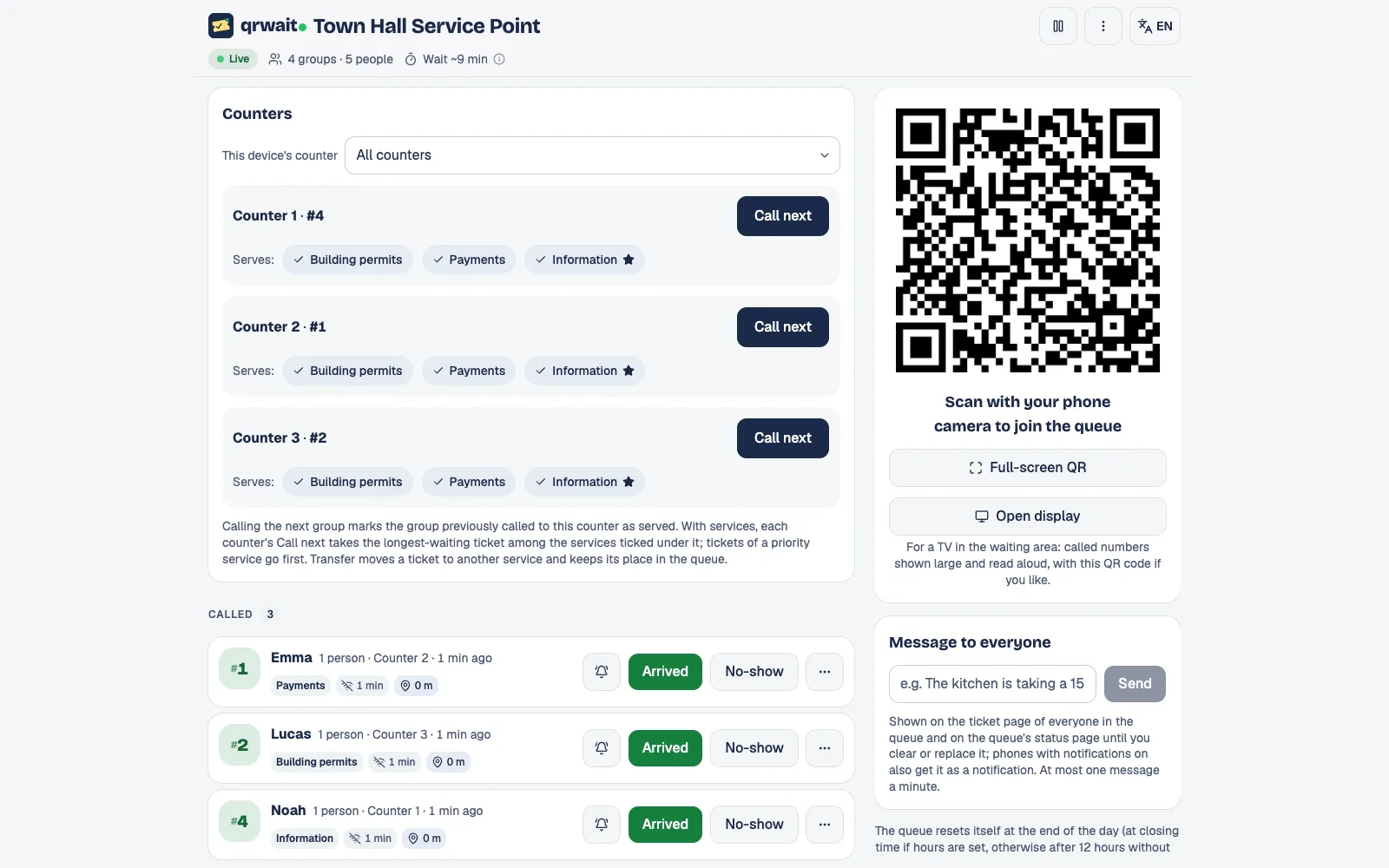
Each counter is set to serve some or all of the services. "Call next" takes the visitor who has waited longest for those services, and their phone tells them which counter to go to.
10:15
The wrong desk
A visitor at the information desk also needs to pay. The attendant moves their ticket to the cashier's queue: it gets a new number there but keeps its join time, so they don't start again at the back.
End of the day
The numbers
Visitors served per counter and per attendant, the average service time, no-shows and the busiest hours, with CSV export. Counts only: no names or phone numbers.
The attendant panel
Questions
- No. They get a number; nothing else is asked.
- Yes. Create a queue for each service or building, each with its own address and QR code.
- Yes. In counters mode a service can be marked as priority: its tickets are called before the others.
- Yes. Turn on appointments with your own slot length, bookable hours and how many bookings each service takes per slot; booked visitors and walk-ins share one list.
- Yes. Any TV or tablet with a browser becomes a "now serving" display: the numbers being called with their counter, how many are waiting and the estimated wait, read aloud as they are called.
- Yes. Each queue can show a KVKK or GDPR notice, as a text, a link or both, where visitors join, at the kiosk and on the status page.
- The first 250 tickets are free. After that you buy ticket packs; one balance covers all your service points.
From the blog
Other uses
More businesses
Want help setting it up?
Write to us and we'll set up your first queue together.