QR code queues for every kind of business.
Vet clinics, barbershops, car services, food trucks, parcel shops, clinics, student offices and ferry piers: people scan a QR code, wait where they like and get called on their phone. See how it works for yours.
Set up your queue in a few minutes. The first 250 tickets are free, no credit card needed.
Message us on WhatsAppA queue for your vet clinic: pets wait outside, not in the waiting room.
Owners scan the QR code at the door, type their pet's name and what's wrong, then wait in the car or outside. Their phone tells them when their turn is coming up. The waiting room stays calm, and the cat doesn't have to sit next to the barking dog.
Scan at the door
No app or account needed. They answer the short questions you set, such as the pet's name and the reason for the visit.
You call the next one
Each person's answers open with a tap in the panel, so you see who is coming and why.
Their phone tells them
A notification when they're two places away and another when it's their turn; the screen turns green.
Your own questions
Up to three questions when joining: the pet's name, the species, the reason for the visit.
Emergencies first
In counters mode, mark an "Emergency" service as priority: its tickets are called before the others.
Appointments and walk-ins together
Set the slot length, places per slot, how many days ahead and the bookable hours; booked visitors and walk-ins share one list.
No phone, no problem
A tablet at the desk works as a kiosk and can print the number on a receipt printer; staff can also add anyone with one tap.
- No. The queue opens in the phone's browser after scanning the code.
- Yes. Their answers open next to their number in the attendant panel.
A walk-in queue for barbershops and salons.
Customers scan the code at the door, see how long the wait is and go for a coffee instead of filling your chairs. When their barber is nearly free, their phone tells them to come back.
Scan at the door
They see how many are ahead and an estimated wait before they decide to stay.
Wait where they like
Next door, in the car or nearby; their place is kept.
Come back when called
A notification when they're two away and another when it's their turn.
Pick a barber
Make each barber a service and give each chair its own: customers choose a barber when joining, and each chair calls only its customers.
Estimated wait
Customers see an estimate based on how fast people have been served, so they know whether to stay.
No-shows move on
Give called customers 3 to 30 minutes to arrive; if they don't, they drop from the queue automatically.
Opening hours
Joining closes at your closing time, and you can pause new joins with one tap when the list is long enough.
- Yes. Turn on appointments with your own slot length and bookable hours; booked and walk-in customers share one list.
- Add them with one tap and tell them their number.
A queue for car services and the tyre change rush.
When the season turns, everyone wants their tyres changed the same week. Customers scan the QR code, wait in the café or nearby, and their phone tells them when it's their turn at the bay.
Scan on arrival
The QR code is at the gate or the reception desk. No app or sign-up needed.
Wait nearby
They see how many cars are ahead and an estimated wait.
Drive in when called
Their phone tells them and shows which bay to go to.
Bays as counters
Each bay or lift is a counter: call the next car to bay 2 with one tap.
Tyre change or service
Customers pick a service when joining, and each bay calls only the services it handles.
Paid for the busy weeks only
Prepaid tickets never expire, so the quiet months cost nothing and what's left waits for the next season.
Appointments too
Customers who'd rather book pick a slot; booked and walk-in cars share one list.
- No. The queue opens in the phone's browser.
- Yes. Staff add anyone to the queue with one tap and tell them their number.
A queue for your food truck that moves with you.
Customers order, scan the code and step out of the crowd. When the order is ready, their phone tells them. Wherever you park today, the location check can follow your phone, so only people nearby can join.
Order and scan
The QR code is on the counter or on a tablet in the window.
Step aside
Customers see their number and how many are ahead, and can sit down or look around.
Collect when called
Call the next number when an order is ready; their phone tells them.
The location follows you
The location check can use the attendant's live location instead of a fixed point, so the queue moves with the truck.
No screenshots passed around
On a tablet the QR code changes every 15 to 75 seconds, so a photo shared in a chat gets nobody in.
A screen for the crowd
Any tablet or TV with a browser shows the numbers being called and reads them aloud.
Festival days only
Prepaid tickets never expire: pay for the busy weekends, not for the months off.
- No. Scanning opens the queue in the phone's browser.
- Yes. There's no subscription; use the free tickets or buy a pack when you need one.
- Add them with one tap and tell them their number.
A queue for parcel shops and post counters.
Sending, collecting and returns all wait at the same counter, and the line spills out of the door. Customers scan the QR code, pick what they came for and wait where they like until their number is called.
Scan and pick a service
Send, collect or return: they choose when taking a number.
Wait where they like
They follow their place live and see an estimated wait.
Come to the counter when called
Their phone tells them and shows which counter to go to.
Services by counter
Each counter calls only the services it handles, so collections don't wait behind a long line of senders.
No ticket machine
The panel runs on any tablet or phone; a tablet kiosk can print numbers for people without a phone.
A display for the shop
Any TV with a browser shows the numbers and counters being called and reads them aloud.
Busy hours in numbers
Daily counts, average wait and joins by hour, exportable as CSV, to plan staff for the peaks.
- No. They get a number; you can turn on a name question if you want one.
- Yes. Each branch gets its own queue and address; one ticket balance covers all of them.
A queue for outpatient clinics, without names called out.
Patients scan the QR code at reception, take a number and wait where they're comfortable instead of in a crowded corridor. They're called by number, not by name, and their phone shows which room to go to.
Scan at reception
They pick the department or doctor they came for.
Wait comfortably
In the garden, the café or the car; they see how many are ahead.
Go in when called
The phone shows the number and the room.
No names called
Patients are called by number. The name question stays off unless you turn it on, and statistics are counts only.
Priority patients
Mark a service as priority, for example for older or pregnant patients, and its tickets are called first.
Appointments and walk-ins
Booked patients and walk-ins share one list; you set the slot length and the bookable hours.
A display in the waiting area
Any TV with a browser shows the numbers and rooms being called and reads them aloud.
- No. The queue opens in the phone's browser, and staff can add patients without a smartphone.
- QR Wait asks for none: patients get a number. Any question you add when joining is up to you, so keep health details out of it.
A queue for student services in registration week.
Registration week fills the corridor outside student services. Students scan the QR code, take a number for what they need and go to class or the café until they're called.
Scan outside the office
They pick a service: registration, transcripts or ID cards.
Go about their day
They follow their place live from their phone.
Come when called
A notification when they're two away and another when it's their turn.
A service for each request
Each desk calls only the services it handles.
Check before coming
Each queue has a public status page, so students can see how busy it is before they walk over.
Office hours
Joining is limited to office hours and can be paused when the day's list is full.
The peaks in numbers
Daily counts, average wait and busy hours, exportable as CSV, to plan staff for next term.
- No. The queue opens in the phone's browser.
- Yes. Cap the number of waiting tickets, set joining hours, or pause new joins with one tap.
A boarding queue for ferries, boat tours and piers.
Instead of a crowd at the gangway, passengers scan the QR code, say how many they are and wait in the shade. When the next boat docks, you enter how many seats it has and the next groups are called.
Scan at the pier
They choose their group size. No app or sign-up needed, in their own language.
Wait nearby
They see their place and an estimated wait for the next boat.
Board when called
Their phone tells them; they show their number at the gangway.
Call by seats
Enter how many seats the boat has; the next groups are called automatically.
In 23 languages
Each passenger's page opens in their phone's language, and the poster says "scan to join" in up to three languages.
No joining from the hotel
The location check keeps the queue to people at the pier.
Every pier in one account
Each pier or route gets its own queue, address and display screen.
- Staff add them with one tap and tell them their number.
- Yes. Each queue has a public status page that shows how busy it is.
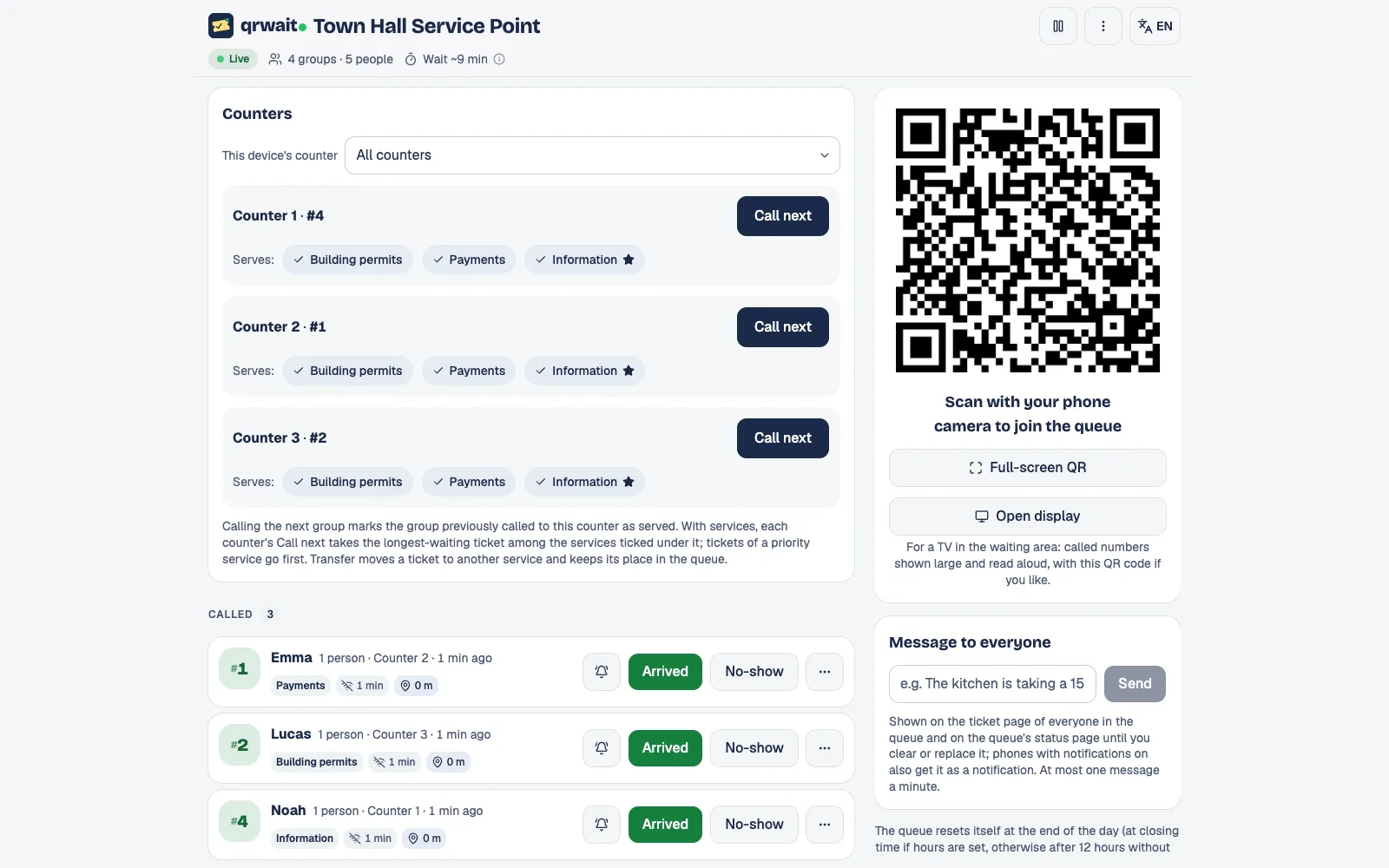
The attendant panel
Questions
- The first 250 tickets are free. After that you buy prepaid packs that never expire; there's no monthly fee.
Other uses
Want help setting it up?
Write to us and we'll set up your first queue together.